Search for the best clipboard manager for Windows and most lists crown a single winner. In practice these tools are built for different jobs: one is a lightweight open-source history, another is a scripting toolkit, another is a macro engine. This page compares six of them by what each does best, so you can match the tool to the way you work.
How we compared them
Disclosure: this article is published by the team behind QuickPaste. We have tried to describe every tool fairly, linked to each project so you can check our claims, and been direct about where the alternatives are stronger. Prices and features were checked in September 2026 and can change, so confirm on each vendor's site before you buy.
Scope: this comparison focuses on Windows clipboard use, organization, privacy model, pricing and workflow. It does not try to score every advanced feature of every tool.
Comparison at a glance
| App | Best for | Pricing | Where your data lives | Worth knowing |
|---|---|---|---|---|
| QuickPaste | Local, all-in-one organization: history, snippets, templates, vault | Free; Pro is £9.99 one-time | On your PC, no account | Windows only, no cloud sync |
| Ditto | Free, open-source clipboard history | Free, open source (GPLv3) | Local database; optional sync between your PCs | Focused on history rather than separate libraries |
| CopyQ | Scripting and customization | Free, open source | Local | More to learn; also runs on Linux and macOS |
| ClipboardFusion | Macros and automation | Free tier; lifetime Pro license from $19 | Local; optional online sync with Pro | More features than many people need |
| ClipClip | Simple folder-style clips | Free | Local; optional sync through a cloud provider you choose | Closed source |
| Windows Clipboard History | Built-in basics | Free, built in | Local; optional sync via a Microsoft account | 25 entries, cleared on restart except pinned |
QuickPaste: best for local, all-in-one organization
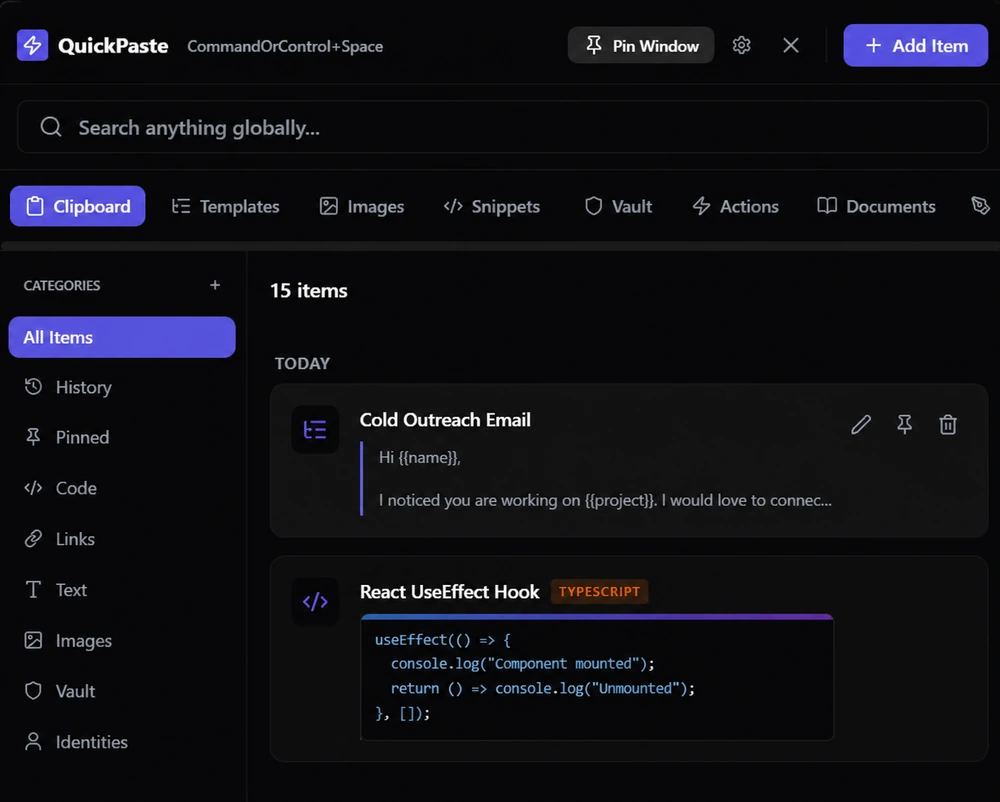
QuickPaste treats the clipboard as the front door to a small productivity hub. Press your global hotkey (you set it in Settings; our screenshots use Ctrl + Space) and one search box looks across your clipboard history, snippets, templates, links, images, identities, actions, notes and emojis.
What it does well
- Organization beyond a flat list. Reusable content lives in its own section, so snippets, templates and clipboard history each work differently.
- A permanent free plan. No trial and no account. Pro removes the limits for a one-time £9.99. Details in why QuickPaste is free forever.
- Local by design. Data is stored on your PC, and the internet is only used for the one-time Pro license activation.
- A separate vault. Sensitive items are masked by default, revealed when you click, and kept out of your Clipboard history.
- Encrypted exports. Exports require Master PIN verification and are encrypted with AES-256-GCM using a key derived from a separate backup password. See how the encryption works.
Where it falls short: Windows only, and deliberately no cloud sync, so it will not mirror your clipboard to a phone or second PC. The Free plan caps how much you can store (25 clipboard items, 3 snippets, 3 templates and so on), and it has no scripting or command-line interface.
Ditto: best for free, open-source history
Ditto is a long-standing Windows favorite. It saves what you copy, supports text, images, HTML and custom formats, lets you search and paste from a hotkey, and can sync several computers over an encrypted network connection.
Strengths: completely free, open source, lightweight, no item caps to worry about. Trade-offs: the interface is more utilitarian than QuickPaste's, and it centers on history more than on separate snippet and template libraries. If free, open-source history with no item cap is your priority, Ditto is a strong fit.
CopyQ: best for scripting and customization
CopyQ stores text, HTML, images and custom formats in customizable tabs, with notes, tags, system-wide shortcuts, and a command-line and scripting interface. It also runs on Linux and macOS.
Strengths: extremely flexible, free and open source. Trade-offs: the flexibility comes with a learning curve, and it is aimed at people who are comfortable configuring their own workflow.
ClipboardFusion: best for macros and automation
ClipboardFusion from Binary Fortress is the automation-heavy option: hotkeys, text replacement, triggers and scripted macros. Basic functionality is free on a personal PC, while clipboard syncing and advanced triggers sit behind a Pro license, sold as a lifetime purchase (the vendor's purchase page listed $19 Standard and $29 Personal when we checked). Pro has a 30-day trial.
Strengths: deep automation and mature syncing. Trade-offs: more to learn than most people need, and the most useful extras require Pro.
ClipClip: best for simple folder-style clips
ClipClip saves text, images and links, lets you organize clips into folders, and offers a dedicated paste menu (Ctrl + Shift + V) and pinned clips. It is a reasonable fit if you want a free tool with folder-style organization.
Windows Clipboard History (Win+V): best for the basics
According to Microsoft's documentation, clipboard history is limited to 25 entries and 4 MB per item, supports text, HTML and bitmap formats, and is cleared when you restart your PC apart from pinned items. Syncing across devices is optional and tied to your Microsoft or work account.
It is a sensible default and costs nothing. It is not built for organizing or re-using content, which is what the other tools add. We break down the differences in Win+V vs a real clipboard manager, and if you have not switched it on yet, here is how to turn on clipboard history in Windows.
How to choose
- You want free and open source, with no item caps: Ditto or CopyQ.
- You want scripting and command-line control: CopyQ.
- You want macros and text automation: ClipboardFusion.
- You want history plus snippets, templates and a vault in one local app: QuickPaste.
- You want simple folders and a free tool: ClipClip.
- You only paste the last few things you copied: stay with Win+V.
Three questions settle most decisions. Where should my data live? (see local-first vs cloud clipboard managers). How do I want to pay? (see why QuickPaste is free forever for how we think about it). What will I keep and re-use? If the answer is "a lot", pick a tool with real organization, not just a longer list.